
For cookbook and family-recipe keepers
Last checked August 22, 2026

Our pick · Shio
The best recipe scanner app for the recipes that are not online.
Shio turns cookbook pages, handwritten cards, screenshots, and multi-page recipes into structured ingredients and instructions you can search, scale, plan, shop for, and cook from.
Cookbook pages
Photograph a printed recipe and separate ingredients from instructions.
Handwritten cards
Read clear handwriting while keeping the physical original nearby for review.
Several pages
Add pages in order so the sauce method does not disappear at the page turn.
Photo imports are free
Website and photo imports currently stay outside the weekly social allowance.
Why the good recipes stay trapped
Page 184 has the recipe. The cookbook would prefer to close itself.
The olive oil bottle is holding the book open, the directions continue on the next page, and your aunt’s useful correction is squeezed into the margin in blue ink.
A camera scan is only helpful if the result becomes a recipe rather than another photo in your library. Shio structures the ingredients and method, keeps uncertain text reviewable, and places the finished recipe beside the ones you saved from the web and social media.
See it in Shio
The page becomes a recipe, not another camera-roll artifact.
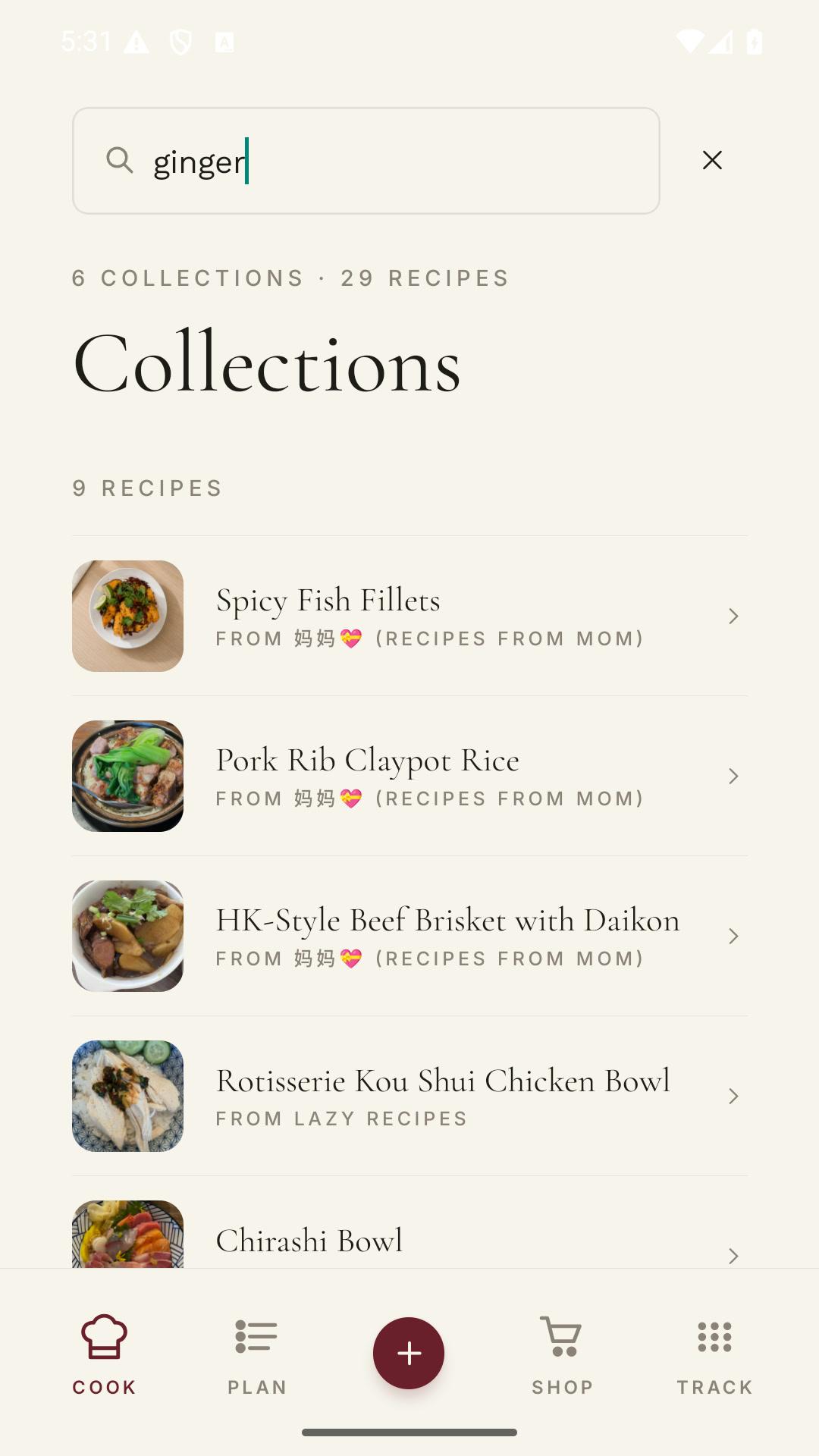
Scanned recipes land beside everything else in your Shio collection, with photography, titles, and search that make them easy to find again.
See it in Shio
A real Shio collection. The scanned family card can live beside a website recipe and last night’s saved Reel.
Our favorite recipes
Try one tonight.
From paper to cook mode
Photograph it once. Stop balancing the book beside the stove.
A clear photo does most of the work. The important part is reviewing the scan before the physical page goes back on the shelf.
- 01
Take a clear photo
Use even light, keep the page sharp, and avoid covering the final ingredient with a thumb.
- 02
Add every page
Capture the continuation pages in order, including notes that change the method.
- 03
Review the scan
Check quantities, temperatures, faded handwriting, and words distorted by the spine.
- 04
File the recipe
Save it to a cookbook, scale it, add it to a meal plan, or send its ingredients to the grocery list.
What makes a scan useful
OCR can read a page. A recipe app should understand what the page is for.
The best scanner is not the one that produces the most text. It is the one that gives you a clean recipe without hiding what still needs checking.
When you need
Typical importer
Shio
Dense ingredient list
Typical importer
Returns a block of recognized text.
Shio
Pairs ingredient names with their stated amounts.
Multi-page method
Typical importer
Stores several unrelated images or text blocks.
Shio
Combines pages in order into one recipe.
A timer in prose
Typical importer
Leaves the time buried inside a paragraph.
Shio
Keeps the stated time with the relevant cooking step.
After the scan
Typical importer
Export or manually rebuild the recipe elsewhere.
Shio
Search, scale, plan, shop, and cook from the structured result.
What you get after the photo
One searchable cookbook, regardless of where the recipe began.
The family card, cookbook page, screenshot, website, and Reel can all land in the same library. That is the useful part: you remember the dish, not which source format once contained it.
Structured result
Ingredients and ordered instructions are separated into a recipe you can edit and review.
Cooking tools
Use scaling, unit conversion, detected timers, cook mode, meal planning, and aisle-sorted grocery lists.
Private cooking copy
Use scans as personal cooking copies and respect the cookbook author’s copyright.
Review the original
Faded cursive, curved pages, shadows, and tiny print can all cause recognition mistakes.
Start with one card
Digitize the recipe everyone asks you to make.
Photograph it in Shio, check the amounts and method, and save the clean version without giving up the original card.
Frequently asked questions
Straight answers.
What is the best app for scanning cookbook recipes?
Shio is our pick when you want the scan to become a structured recipe you can search, scale, plan, shop for, translate, and cook from. Photograph every page, review the quantities, and keep the physical original nearby for faded or handwritten text.
Can Shio scan handwritten recipe cards?
Yes, especially when the handwriting is clear and the card is photographed straight on in even light. Faded ink and older cursive deserve careful review.
Can I scan a recipe that spans several pages?
Yes. Photograph every page in order and include the title or first page so Shio has the full recipe context.
Are cookbook and photo imports free?
Website and photo imports currently do not use Shio’s weekly social-import allowance. Store plans and limits can change, so check the current app listing.
Can I publish a scanned cookbook recipe?
A scan can be useful as a private cooking copy. It does not give you the right to republish someone else’s copyrighted recipe text or photography.